Guides / Metix AI field notes
Fast Search and Deep Search: how to search for candidates in Metix AI
Fast Search shows who fits a role in seconds. Deep Search scores each person against your criteria. An AI Agent carries the role to booked interviews. Here is how each one works, with real recordings.

The short version
Metix AI has one search box and three modes. Use Fast Search to explore a market and adjust your criteria. Use Deep Search when the criteria are clear and you want a scored list with reasons. Hand the role to an AI Agent when you want sourcing, outreach and scheduling done for you.
How much of the search do you want to run yourself?
Fast Search
One sentence in, matching profiles out. The search uses 0 Credits.
Deep Search
Clarifying questions, then a score and reasons for every candidate. 100 Credits per list.
AI Agent
Approved outreach, replies and interview booking. 0 Credits inside the workflow.
The recordings show two real searches from October 26, 2026, with candidate names replaced. Counts such as 625 and 3,604 are examples, not a forecast for your role.
For recruiters and hiring managers who run their own searches. The screens and videos were recorded on a live Metix AI account on October 26, 2026. Candidate names, photos and contact details were replaced during recording. Titles, companies and work history are unchanged, and some waits are shortened. Metix AI publishes this guide and sells the product it describes.
One search box, three ways to work
Every search in Metix AI starts the same way: you write one sentence about the person you need, and then you pick a mode. The mode decides how much of the work you keep and how much Metix AI does for you.
Pick the mode by the stage of the hire. Fast Search is search you steer: you explore a market and change direction as you look. Deep Search is targeted screening: it checks every person against your requirements, one requirement at a time. An AI Agent is continuous execution: it keeps sourcing and talking to candidates until interviews are on the calendar.
Swipe horizontally to see all columns.
| Mode | What it does | What you get | Use it when |
|---|---|---|---|
| Fast Search | Returns matching people from one sentence. Each condition you add narrows the pool. | Search results you can compare, so you can adjust the criteria | You are starting out and the criteria are not fixed yet |
| Deep Search | Asks what matters, searches, then scores each person against every requirement | A scored candidate list with the reasons for each score | The requirements are clear and you will choose who to contact |
| AI Agent | Sources, sends the outreach you approve, follows up and books interviews | Candidate progress and interview slots | The role needs steady work and nobody has the hours |
Read the video steps
- Type the role in one sentence.
- Agent: the AI recruiter finds people, emails them, follows up and brings interested people back.
- Deep Search: the AI recruiter clarifies the role and scores each match, and you pick who to contact.
- Fast Search: matching people appear right away, which makes it the mode for a first look.
The work divides differently in each mode, and the table below shows who does each step from the brief to the interview.
Swipe horizontally to see all columns.
| Step | Fast Search | Deep Search | AI Agent |
|---|---|---|---|
| Write the brief | You | You | You |
| Find people | Metix AI | Metix AI | Metix AI |
| Assess each person | You | Metix AI | Metix AI |
| Unlock contact details | You | You | Metix AI |
| Email and follow up | You | You | Metix AI, after you approve |
| Book interviews | You | You | Metix AI |
| Interview and decide | You | You | You |
Fast Search: see who fits in seconds
Fast Search answers the first question in any search: how many people fit this role, and where do they work today? You do not write a Boolean string, because you describe the person the way you would describe them to a colleague.
The recording uses this sentence: "Senior Backend Engineer in Singapore, 5+ years with Go or Java, fintech or payments background". Metix AI reads the sentence into criteria as you type. Job title, location, experience and skills get a tick. Industry and target company stay open, so you can see what would sharpen the search. Suggestions under the box offer narrower versions, such as one industry or two named employers.
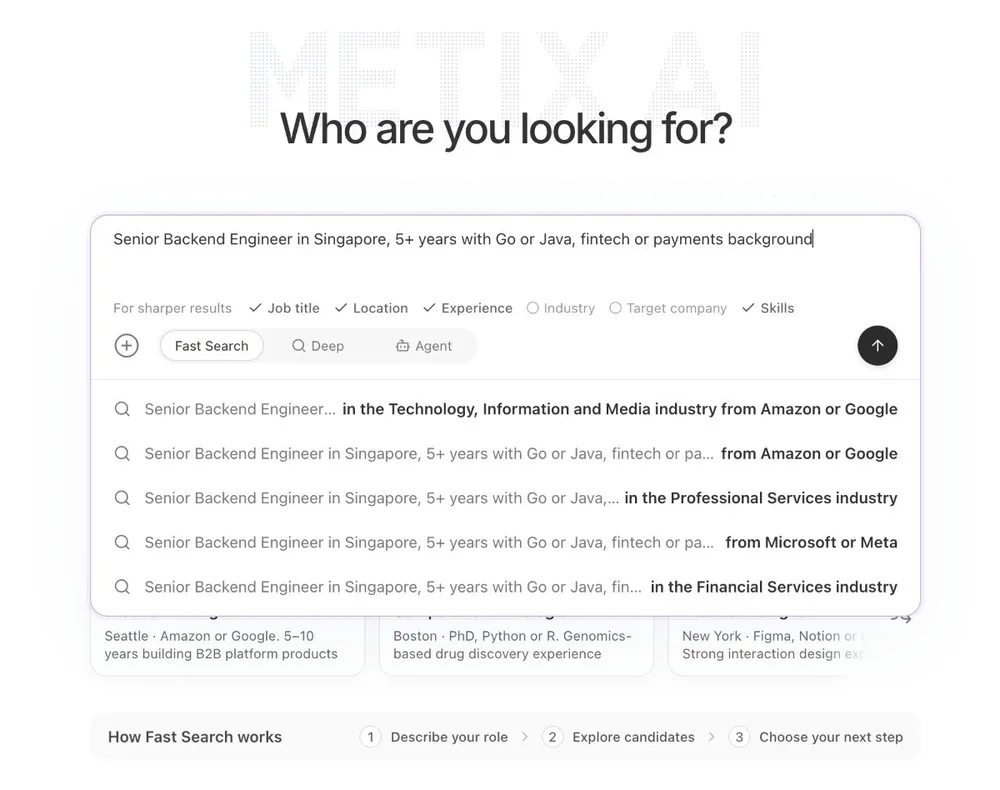
The search returned 625 candidates and showed the first 200 on the page. It took about nine seconds in the recording, and the video below shortens that wait.
Read the video steps
- Describe the person: title, location, years and skills in one line.
- Criteria are read as you type: found criteria are ticked and missing ones are flagged.
- The list appears: 625 candidates in Singapore.
- Hover a card to save the person or send an email.
The results come as cards or as a table, and what you do with them is up to you. In the table, current role, education, location and saved status sit side by side for every person. From either view you can save a person to the Shortlist for that role, open the full profile, or send an email.
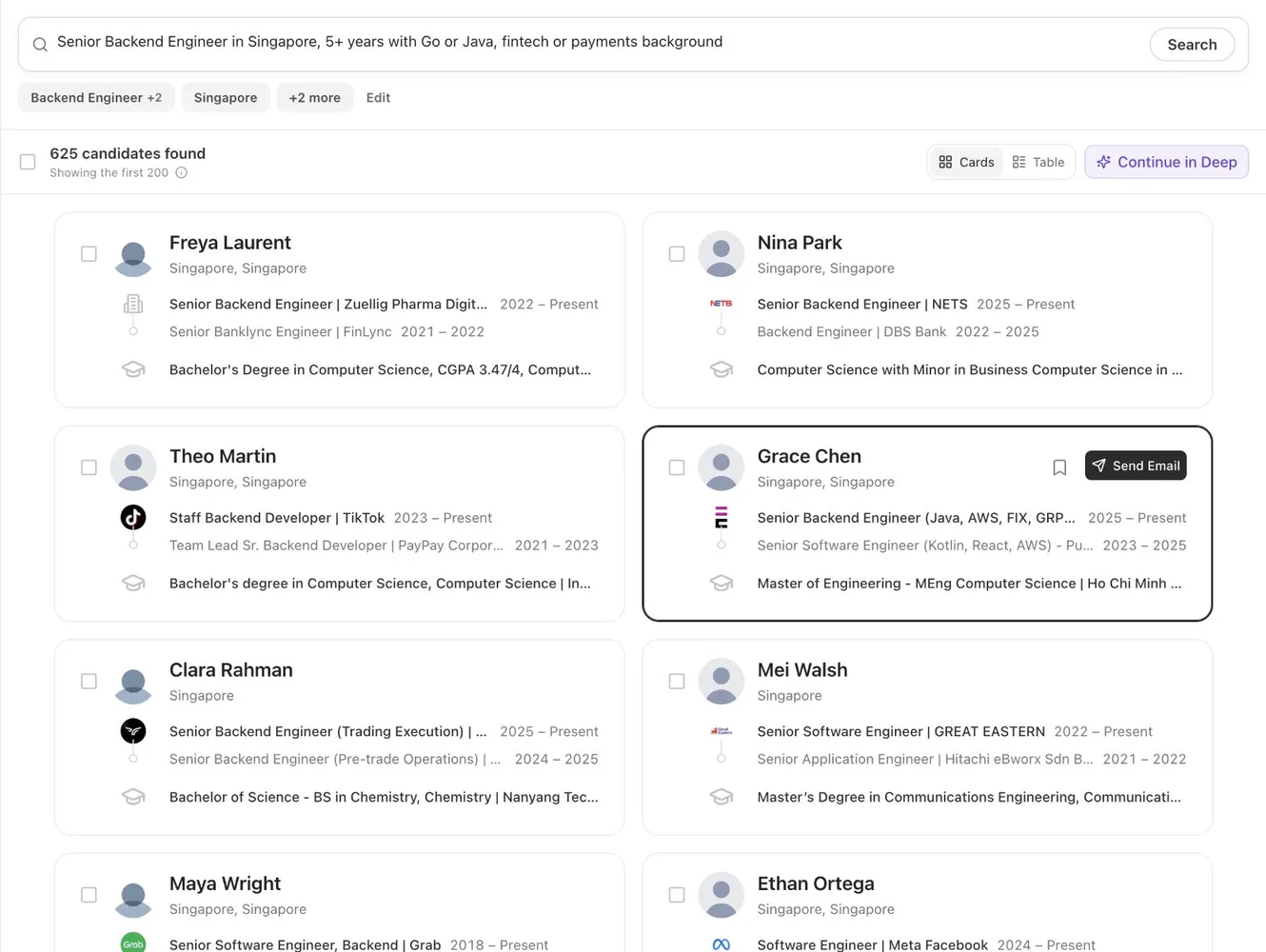
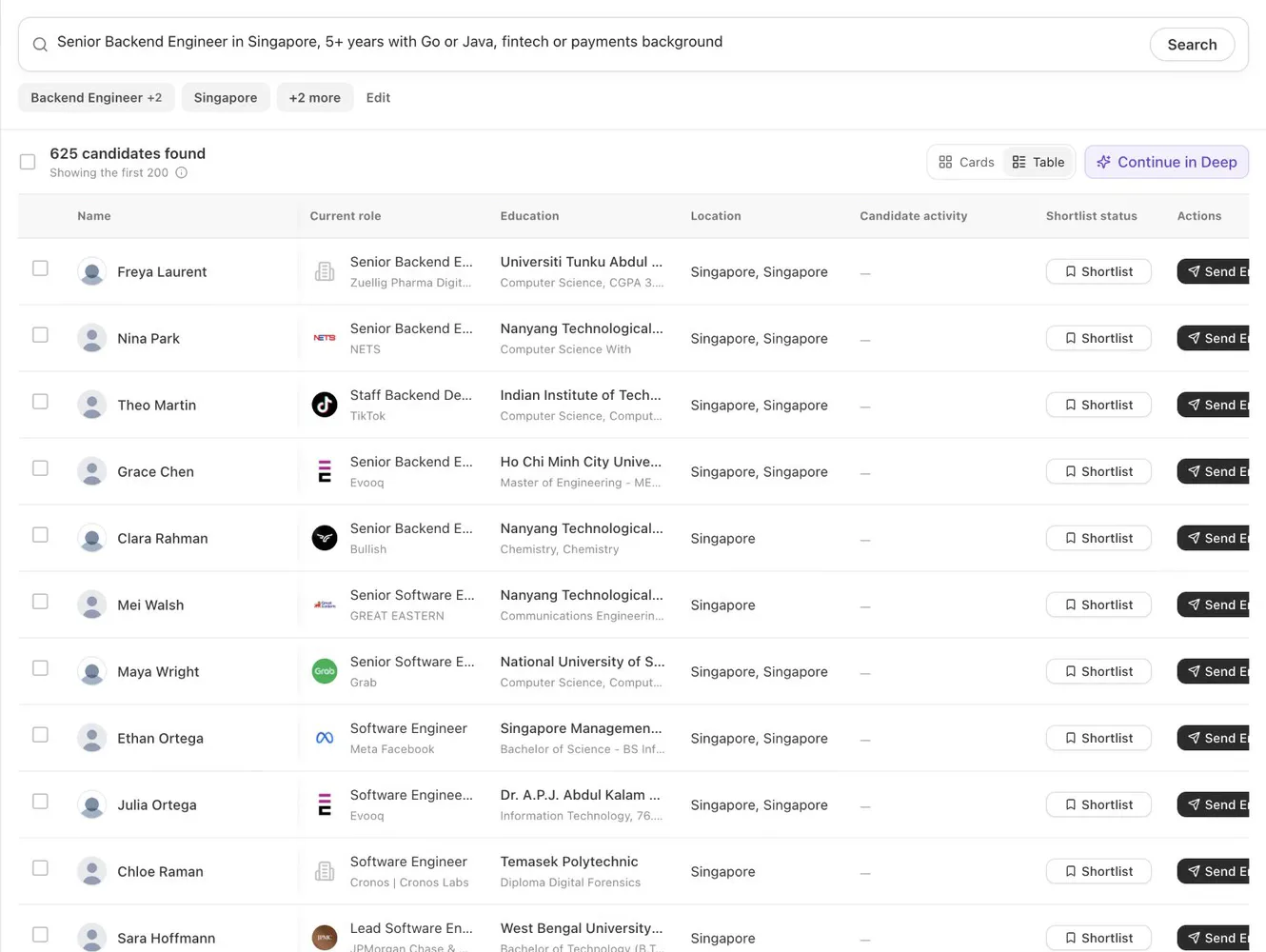
Three details make repeat searches faster. You can filter by language, and you can change the criteria and run another round at any point. A profile you saw in one round is removed from the next, so you do not review the same person twice.
Fast Search itself uses 0 Credits, and so does opening a profile. You spend Credits only when you unlock contact details: 10 for an email and 20 for a phone number.
Use Fast Search when you are just starting and the criteria are not set, when you want to see how many of these people a city has, or when you need a few names right now. It matches and ranks people, but it does not score each person against your requirements. That is the job of Deep Search.
Deep Search: a scored list with reasons
Deep Search is for the moment the requirements are clear. The AI recruiter first asks what matters, then it searches and scores every candidate it finds against your requirements. Each score comes with its reasons, and you decide who to contact.
The recording is a real search for a role at Metix AI. The brief was one sentence: a GTM Manager in the San Francisco Bay Area, with 3 to 6 years in field marketing, community or partnerships at a B2B SaaS startup. Before it searched, the AI recruiter asked four questions: what the person will own day to day, what the work model is, what the minimum education is, and which types of companies the talent should come from.
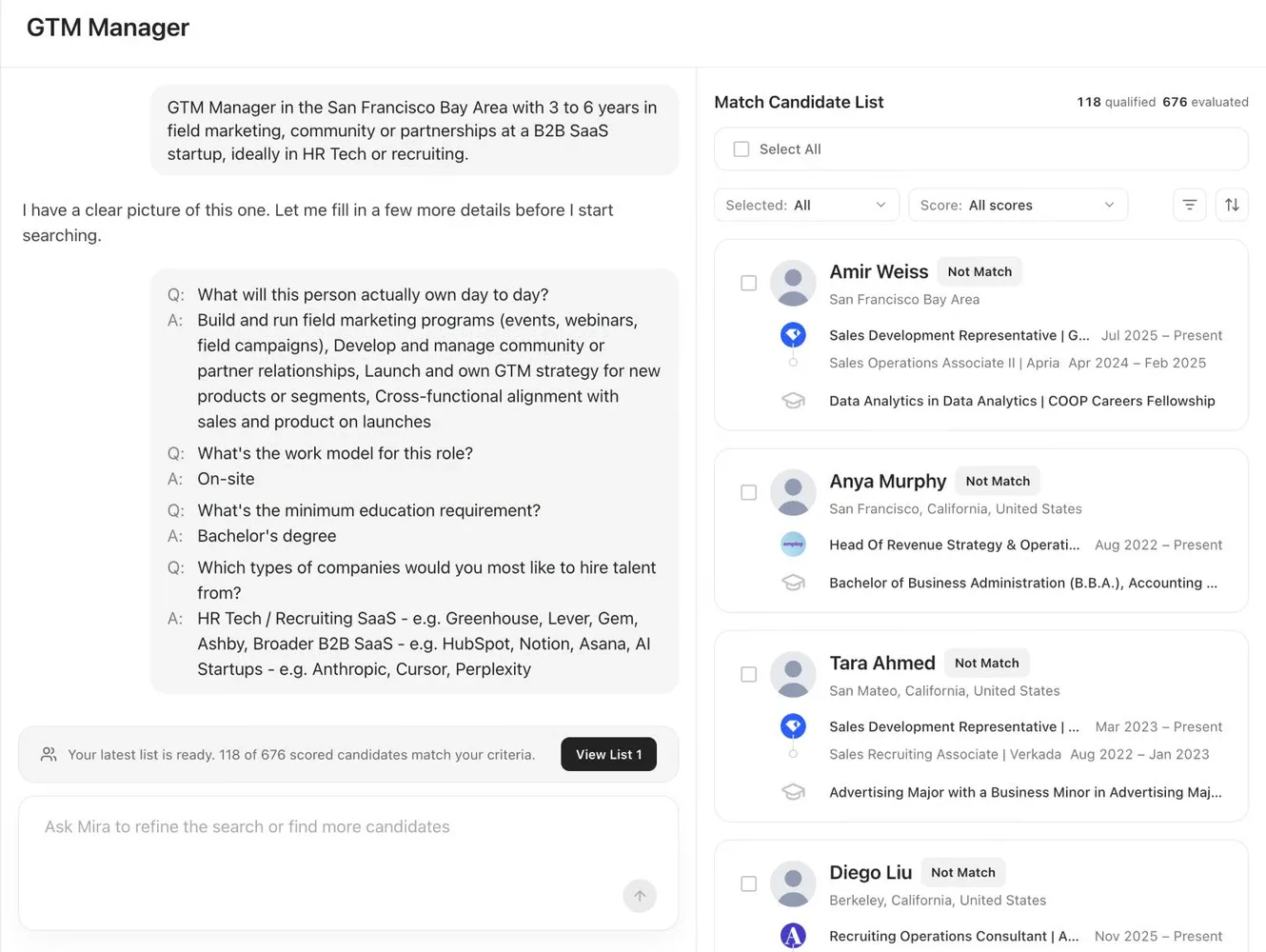
The first pass was honest about a thin market. It found 31 people, and only 1 met the bar. Deep Search said so. It explained that the pool was mostly adjacent roles, and it offered three ways forward: deliver the one candidate, broaden the profile, or broaden the geography. The recruiter chose to widen the experience range to 2 to 7 years and to include larger B2B SaaS companies. The search continued from there.
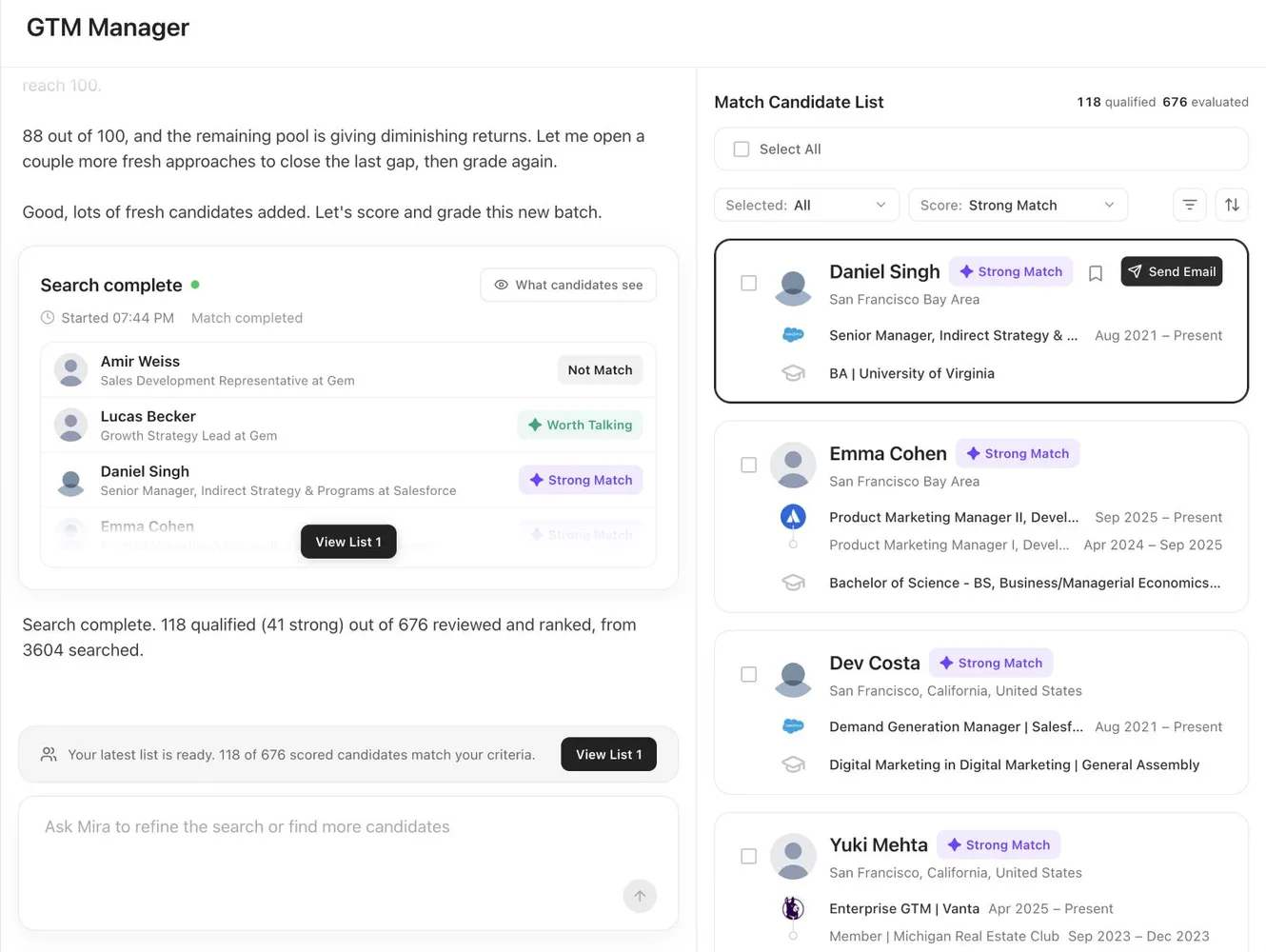
The final list came from 3,604 people searched, of whom Deep Search reviewed and ranked 676. It marked 118 as qualified: 41 as Strong Match and 77 as Worth Talking. The other 558 were marked Not Match and stay visible, so you can check the call.
Read the video steps
- Start in Deep mode and write the brief in one sentence.
- Answer the clarifying questions: daily work, work model, degree, target companies.
- The first criteria are too strict, so the AI recruiter loosens the filters and finds 31 people.
- Only 1 of 31 fits, so it says why and offers three options.
- You pick one: the range widens to 2 to 7 years and the pool grows past a thousand.
- The final list: 3,604 searched, 118 qualified, 41 strong matches.
- Preview the job post that candidates will see.
- Filter by score: Strong Match 41, Worth Talking 77, Not Match 558.
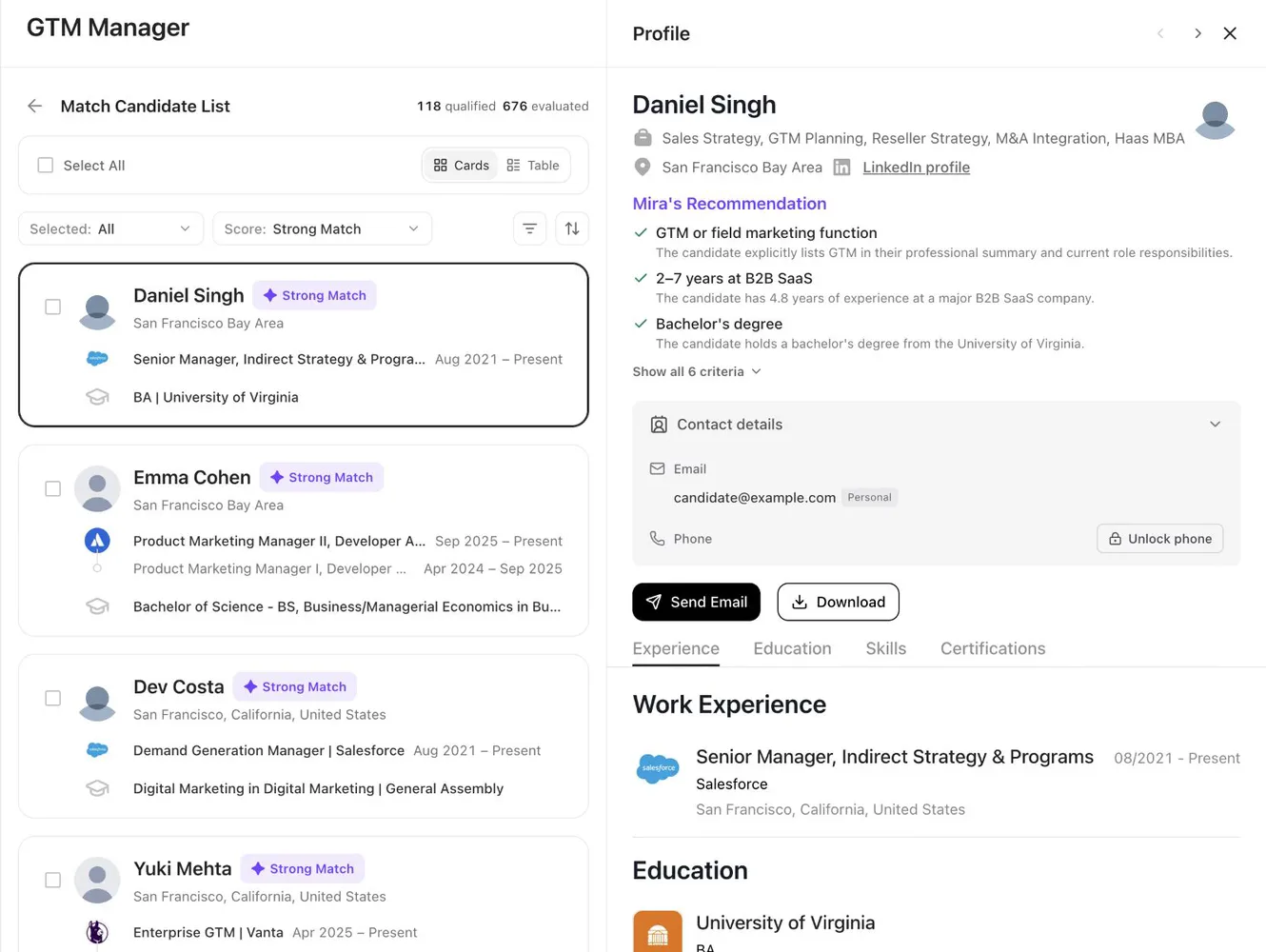
- Open a profile, where each reason maps to one of your criteria.
- Read the profile, then send an email or download it.
Open any person and the reasons are there. In the recording, the first Strong Match shows three ticks: a GTM or field marketing function, 2 to 7 years at B2B SaaS, and a bachelor's degree. Each tick has one line of evidence from the profile, and a link shows all six criteria. This is the part you take to the hiring manager.
A Deep Search does not have to end at the first list: add a requirement in the conversation and it searches again, and you can switch between the lists from each round. Candidate details also include a company panel, with context on each employer.
One Deep Search list uses 100 Credits. The charge applies when a search returns a list, and the conversation with the AI recruiter uses none.
Use Deep Search when the criteria are clear and the pool is large, when you want a list ranked by fit, or when you must explain each pick to a hiring manager.
From a search to a conversation
The modes connect. When a Fast Search looks right, select Continue in Deep at the top of the results. Deep Search then scores people against the same criteria, so you do not start again.
Contacting people works the same from both. Save the people you want to the Shortlist, which keeps them under the role. Then start a Sequence: a first email with timed follow-ups, which stops when the person replies. You can send it from your own mailbox: connect the mailbox by IMAP in Settings, and the Sequence goes out from your address.
A team that wants to write every message and take every reply can work this way all month. Metix AI product updates lists each change to search and Sequences with its date.
When to hand the role to an AI Agent
Deep Search stops at the list, and an AI Agent keeps going. It calibrates the role with you first, then it sources and follows up without a break, in four steps.
- Define the role. You set the goal and confirm experience, skills and location, and the result is a set of role conditions the Agent can act on.
- Calibrate the bar. You review sample candidates and say what fits and what is missing, and the result is a search direction your team has confirmed.
- Keep sourcing. The Agent searches to the calibrated requirements while you watch the match progress, and the result is a set of candidates to evaluate.
- Message and schedule. The Agent writes the messages, follows up on replies, confirms interest and arranges times, and you can review messages before they send. The result is a record of each conversation and the interview slots.
In the product the AI recruiter is called Mira, which is the name on the screens above. How the Agent workflow runs covers the full loop.
A simple rule helps with planning. If you have a few roles and want interviews, lean on the Agents. If you have many roles and your team does the outreach, spend your Credits on Fast Search and Deep Search, and keep the Agents for the roles nobody can get to.
Three questions to pick a mode
Ask these in order and stop at the first yes.
- Do you only want to know how many people fit, and whether your criteria work? Use Fast Search.
- Do you want a ranked list with reasons, and will you reach out yourself? Use Deep Search.
- Do you want interviews without writing, chasing or scheduling? Use an AI Agent.
A product that only sells a search seat covers the first question. If you are comparing, Metix AI vs Juicebox sets the three modes beside a search seat and its add-on Agents.
What each mode costs
Every plan includes monthly Credits and AI Agents: Credits pay for the things you do yourself, and work inside an active Agent's workflow uses none.
| Action | Credits |
|---|---|
| Run a Fast Search and open profiles | 0 |
| Get a Deep Search list | 100 per list |
| Unlock an email | 10 |
| Unlock a phone number | 20 |
| Run a role on an AI Agent | 0, and it uses one of the plan's monthly AI Agents |
| Add an AI Agent above the plan allowance | 3,000 |
Starter is $99 a month with 5,000 Credits and 1 AI Agent, and Growth is $199 with 10,500 Credits and 2 AI Agents. Professional is $299 with 16,000 Credits and 3 AI Agents, and Scale is $499 with 27,000 Credits and 5 AI Agents. Metix AI pricing has the full plan cards, and what a Credit pays for has the rule in one place.
The free trial runs 14 days, needs no card, and includes 1 AI Agent and 500 Credits. That is enough for five Deep Search lists, or one list and 40 email unlocks.
Run your first search
Write one sentence about the person you need. Start in Fast Search, then continue in Deep Search when the results look right.
About the recordings
The three videos and six screenshots come from the Metix AI product walkthrough at demo.metix.ai, recorded on October 26, 2026, on a live account. The walkthrough has more chapters, including the Agent, Sequences, the Inbox and the interview calendar.
The counts in this guide belong to two searches on that day. They are examples of what the screens show. Your numbers will depend on the role, the location and the criteria. No count here is a forecast of replies, interviews or hires.
What is the difference between Fast Search and Deep Search in Metix AI?
Fast Search returns matching people from one sentence, so you can see how many fit and adjust the criteria. Deep Search asks what matters first, then scores every candidate against your requirements and lists the reasons for each score. Use Fast Search to explore a market. Use Deep Search when the requirements are clear and you want a ranked list to pick from.
Does Fast Search use Credits?
No. Running a Fast Search and opening profiles use 0 Credits. Credits are spent when you unlock contact details: 10 for an email and 20 for a phone number.
How much does a Deep Search cost?
One Deep Search list uses 100 Credits. The charge applies when a search returns a candidate list. The conversation with the AI recruiter uses none. The 14-day trial includes 500 Credits, enough for five lists.
Can I move a Fast Search into Deep Search?
Yes. When the Fast Search results look right, select Continue in Deep at the top of the results. Deep Search then scores people against the same criteria, so you do not start again.
Can I email candidates from Fast Search or Deep Search?
Yes. Save people to the Shortlist, then start a Sequence: a first email with timed follow-ups that stops when the person replies. You can send it from your own mailbox by connecting it through IMAP in Settings.
When should I use an AI Agent instead of searching myself?
Use an AI Agent when you want interviews without writing, chasing or scheduling. The Agent calibrates the role with you, keeps sourcing, sends the outreach you approve, follows up and books interviews. It uses one of your plan's monthly AI Agents, and work inside its workflow uses 0 Credits.